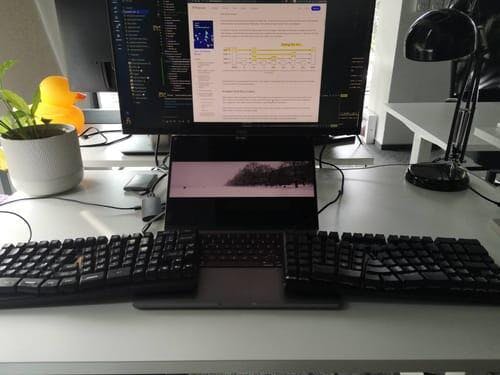
Guillaume C. on Intensive Work and Customizing the Knight Plus
Dr. SigCase Study: 30 Days of Intensive Work with the Knight Plus (Guillaume's Story)
Power User Snapshot
- User: Guillaume C., Professional Heavy Typist.
- Test Period: 1 month of "intensive" labor.
- The Problem: Accidental keypresses on the central Enter key.
- The Fix: Used QMK Firmware to disable the middle key and customize the layout.
- The Result: Zero pain after a high-volume work month.
For heavy users, "ergonomics" isn't a buzzword; it's a requirement for professional survival. Guillaume C. put the X-Bows Knight Plus through the ultimate stress test: one month of intensive professional work.
The Result: Eliminating Intensive Strain
Guillaume’s testimony validates the Knight Plus as a "pro-grade" tool. The solid aluminum construction and ergonomic spread allowed him to work harder and longer without the fatigue that usually accompanies "crunch time."
"I really enjoy this keyboard and layout. After 1 month of intensive work, no more pain in my hands! I wish this layout would become the norm." — Guillaume C., Verified Buyer
Customization: Making the Keyboard Adapt to You
No new layout is without its learning curve. Guillaume noted a specific adaptation hurdle: "The middle enter button is easily pressed by accident."
Because the X-Bows places the Enter key in the center (between the G and H zones), new users sometimes graze it while reaching for other keys. However, Guillaume used the power of QMK/VIA firmware to solve this. By remapping the firmware, he was able to disable the specific key that was causing errors.
This is the X-Bows advantage: You don't just adapt to the hardware; you tame the hardware to fit your specific muscle memory.
A Robust Companion for Mobile Professionals
Guillaume describes the Knight Plus as "robust and compact, perfect to move around." For the mobile professional who demands mechanical precision and ergonomic safety without the bulk of traditional "split" boards, the Knight Plus strikes the perfect balance.
⚕️ Dr. Sig’s Biomechanics Note
Guillaume's "intensive" workload represents a high-risk category for strain: Cumulative Trauma. Even minor awkward reaches, repeated thousands of times a day, can cause tension in the hand and forearm. By utilizing the firmware to customize key placement and following the Radial Layout, Guillaume kept his hands within the "Neutral Zone." This prevents fatigue accumulation and protects the tendons during long-duration typing sessions.