제품 정보로 건너뛰기
1 5

X-Bows® Lite 인체공학 기계식 키보드

The Doctor-Designed Starter Keyboard for Pain-Free Typing

X-Bows® Lite 인체공학 기계식 키보드

89 총 리뷰


X-Bows는 의료 영상 전문의 Dr. Sig가 당신의 경력을 지키기 위해 설계했습니다.

Dr. Sig는 손목터널증후군 환자의 거의 25%가 컴퓨터 사용과 관련이 있다는 사실을 목격한 후, 문제의 근본 원인이 단순히 "과도한 타이핑"이 아니라 잘못된 타이핑임을 깨달았습니다.

왜 기존 키보드가 아픈가요

전통적인 키보드는 1800년대 타자기 시대의 유물입니다. 이들은 몸이 기계에 적응하도록 강요하여 두 가지 주요 생체역학적 결함을 초래합니다:

❌ 새끼손가락 문제

표준 배열은 가장 약한 손가락인 새끼손가락에게 가장 무거운 작업(Enter, Backspace, Shift)을 맡깁니다.

❌ 척골 편위

일직선 행에 맞추기 위해 손목을 바깥쪽으로 구부려야 합니다. 이로 인해 손목터널에 지속적인 긴장이 발생합니다.

자연스러운 요골 해결책

X-Bows는 키를 손가락에 맞추고, 그 반대가 아닙니다.

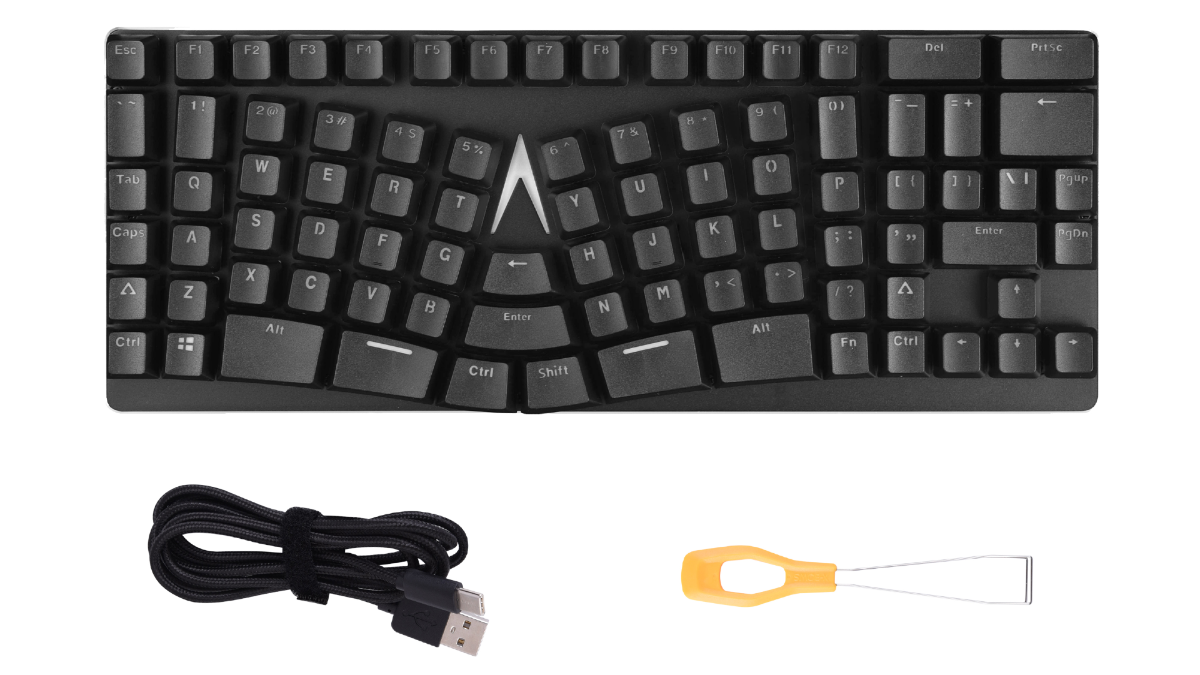
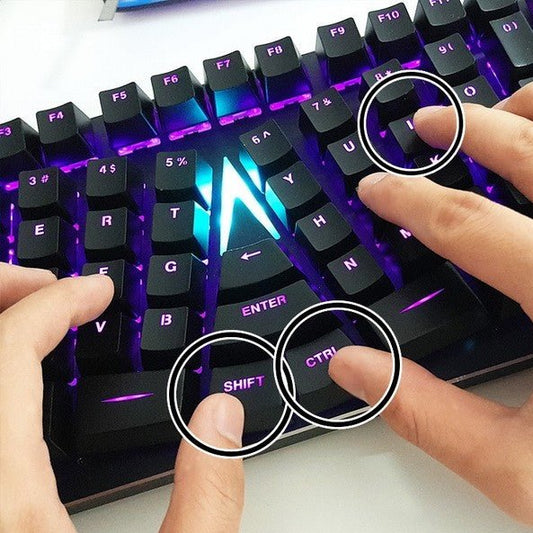
  • 엄지 중심의 힘: 자주 사용하는 키(Enter, Backspace, Ctrl, Shift)를 가장 강한 손가락인 엄지가 쉽게 닿는 중앙으로 이동시켰습니다.
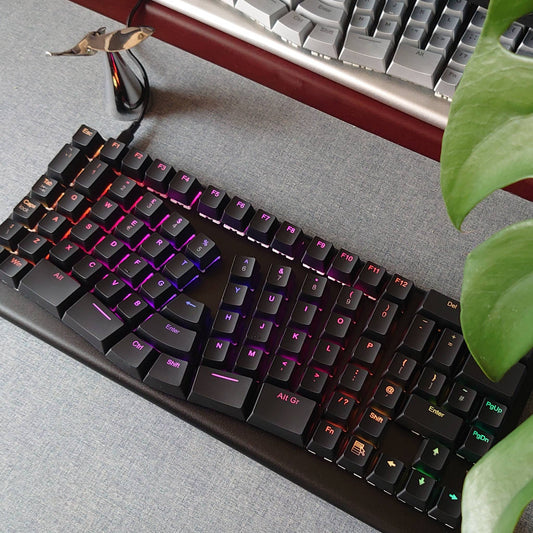
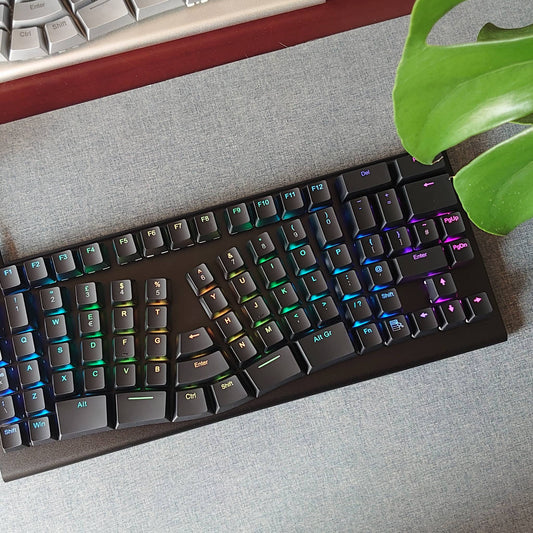
  • 열(column) 배열: 키를 손가락의 자연스러운 신장 방향에 맞춘 수직 열로 배치하여 이동 거리를 줄였습니다.
  • 중립 자세: 분리되고 각도 조절된 구역 덕분에 손목이 곧게 유지되어(0° 편위) 피로가 크게 감소합니다.

연구 결과를 확인해 보세요 →

"X-Bows Nature를 사용한 이후로 손목의 모든 통증이 사라졌습니다. 제 건강을 위해 한 최고의 투자입니다."

— Frederick, 검증된 구매자 ★★★★★

섀시: 가성비

X-Bows Lite는 ABS 섀시에 견고한 알루미늄 합금 패널을 사용합니다. 이 하이브리드 구조는 기계식 키보드 애호가들이 요구하는 견고함과 안정성을 희생하지 않으면서도 가벼운 무게를 제공합니다. 작업 공간 건강을 업그레이드하려는 전문가에게 완벽한 입문용 제품입니다.

전문가용 제어 기능과 전용 소프트웨어

당신의 작업 방식은 독특합니다; 키보드도 그에 맞아야 합니다.

  • 범용 호환성: Mac, Windows 및 Linux를 기본 지원합니다.
  • 레이어 및 매크로: 복잡한 단축키를 한 번의 키 입력으로 프로그래밍할 수 있습니다.

"2주" 약속

우리는 과장보다 정직을 중요하게 생각합니다. X-Bows는 수년간 잘못된 근육 기억을 바로잡기 때문에, 첫날부터는 완전한 속도로 타이핑하지 못할 것입니다.

1~3일차: 손가락이 이전 위치를 찾으려 할 것입니다. 이 "서툼"은 좋은 신호로, 손목이 드디어 곧게 펴졌다는 뜻입니다.

2주차: 근육 기억이 새롭게 형성됩니다. 중앙의 Backspace와 Enter 키가 점점 직관적으로 느껴집니다.

4주차: 대부분의 사용자가 통증 없이 완전한 속도를 회복합니다. 기존 키보드로 돌아가면 "잘못된" 느낌이 들 것입니다.

사용자 후기 읽기 →

Dr. Sig의 추천:

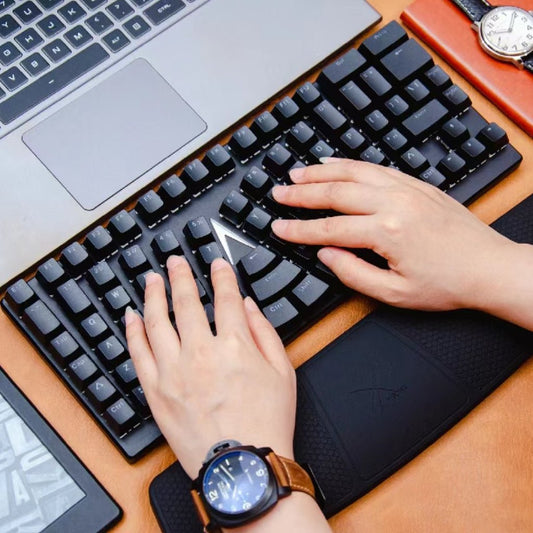
최적의 인체공학적 경험을 위해, 키보드와 함께 X-Bows 손목 받침대를 함께 사용하는 것을 강력히 권장합니다. 손목 받침대는 손목을 위로 구부리는 동작을 방지하여 손목터널 내 압력을 줄이는 데 도움을 줍니다.

정가 $99.00 USD
정가 할인가 $99.00 USD
할인 품절
배송료는 결제 시 계산됩니다.
Switch
  • One-Year Warranty
  • 30-Day Return Guarantee
  • Free Shipping Orders $60+
전체 세부 정보 보기

축소 가능한 콘텐츠

Technical Specifications

  • Patented X-bows layout
  • Programmable
  • Double-shot ABS Keycaps
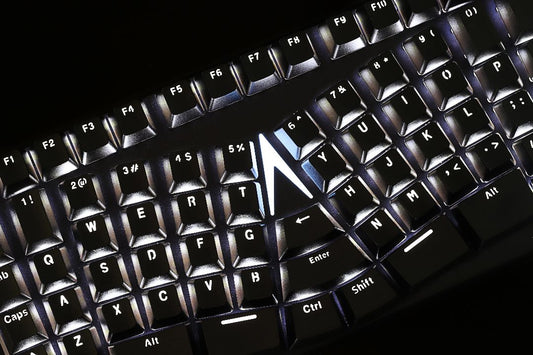
  • Adjustable white backlight
  • N-Key Rollover
  • Windows/Linux/Mac compatible
  • Aluminum alloy panel + ABS

Dimensions & Weight

Width:     128 mm

Length    :345.7 mm

Typing Angle: 6.0º

Weight:   690g 

What's in the Box

  • X-Bows Keyboard x 1
  • Type A-C /Type C to C Cable x 1
  • Keycap Puller x 1
  • Switch Puller x 1
  • Quick Start Guide x 1

What Users Are Saying

★★★★★

"Getting used to it surprisingly quickly"

"I have used a 'standard' layout for over 40 years... but I am getting used to it surprisingly quickly. The layout is great and definitely reduces excess reach."
— Adam B. Verified
★★★★★

"Reduced pain in wrists and shoulders"

"I'm a database engineer and spend all of my days at my desk... X-Bows did reduce some pain in my wrists and shoulders."
— Chris W. Verified
★★★★★

"Best thing I did for my chronic joint issues"

"Due to hypermobility I am prone to chronic joint issues... It took me a little while to get used to, but for anyone with similar joint pains I can definitely...
— Eline B. Verified
★★★★★

"Best ergonomic keyboard I've used"

"I have both the keyboard and detachable number pad. This is the best ergonomic keyboard I've used and I love that it's mechanical."
— Gabe Verified
★★★★★

"Best of all (15 years experience)"

"This is my third ergonomic keyboard in 15 years... It is the best of all. I am won over. I sold my old ergonomic keyboards."
— Hubert Verified
★★★★★

"Wrist pain reduced dramatically"

"The keyboard has good build quality and it's actually ergonomic. My wrist pain reduced dramatically since my purchase."
— Ivan M. Verified
★★★★★

"A great upgrade from the Microsoft Sculpt"

"I used a Microsoft Sculpt Ergonomic keyboard for 5 years... I didn't notice any wrist/posture discomfort switching to the X-Bows. It's really a great upgrade."
— Jean-michel B. Verified
★★★★★

"Amazing for my developer work"

"I use it with Ubuntu and I'm completely happy, everything is Perfecto... amazing for my developer work."
— Jose G. Verified
★★★★★

"My carpal tunnel has improved"

"It took some time getting used to the layout... but I have less strain on my hands now, and my carpal tunnel has improved. I ended up buying a 2nd...
— Karen Verified
★★★★★

"Typing faster than ever before"

"Transition was seamless, after few days I was already typing faster than ever before. Build quality is very good."
— Michał M. Verified
★★★★★

"It took about three days"

"Thought I could beat the curve, but just like everyone else said, it took about three days to get used to. I never realized how uncomfortable normal keyboards are."
— Mike D. Verified
★★★★★

"Far better than Microsoft Ergonomic"

"I used to own a Microsoft Ergonomic keyboard but this one is far better in every way. Once you get used to the layout, typing on it is a breeze."
— Richard M. Verified
★★★★★

"My elbow pain is gone"

"Using this keyboard is a delight. After just a week my elbow pain is gone."
— Santiago M. Verified
★★★★★

"3 months later, pain is gone"

"After having some minor wrist pain I switched over... 3 months later my wrist pain is gone. I actually have ordered 3 of these totally."
— Tony M. Verified
★★★★★

"The best keyboard I have"

"I'm a developer with wrist pain. I bought too many keyboards (Keychron, Moonlander, Dygma, Logitech) to improve comfort. The Knight keyboard is the best keyboard I have."
— Trackvegeta Verified